|
|
以下是修改這篇~~這樣就有換遊戲換卡帶的感覺了~~~
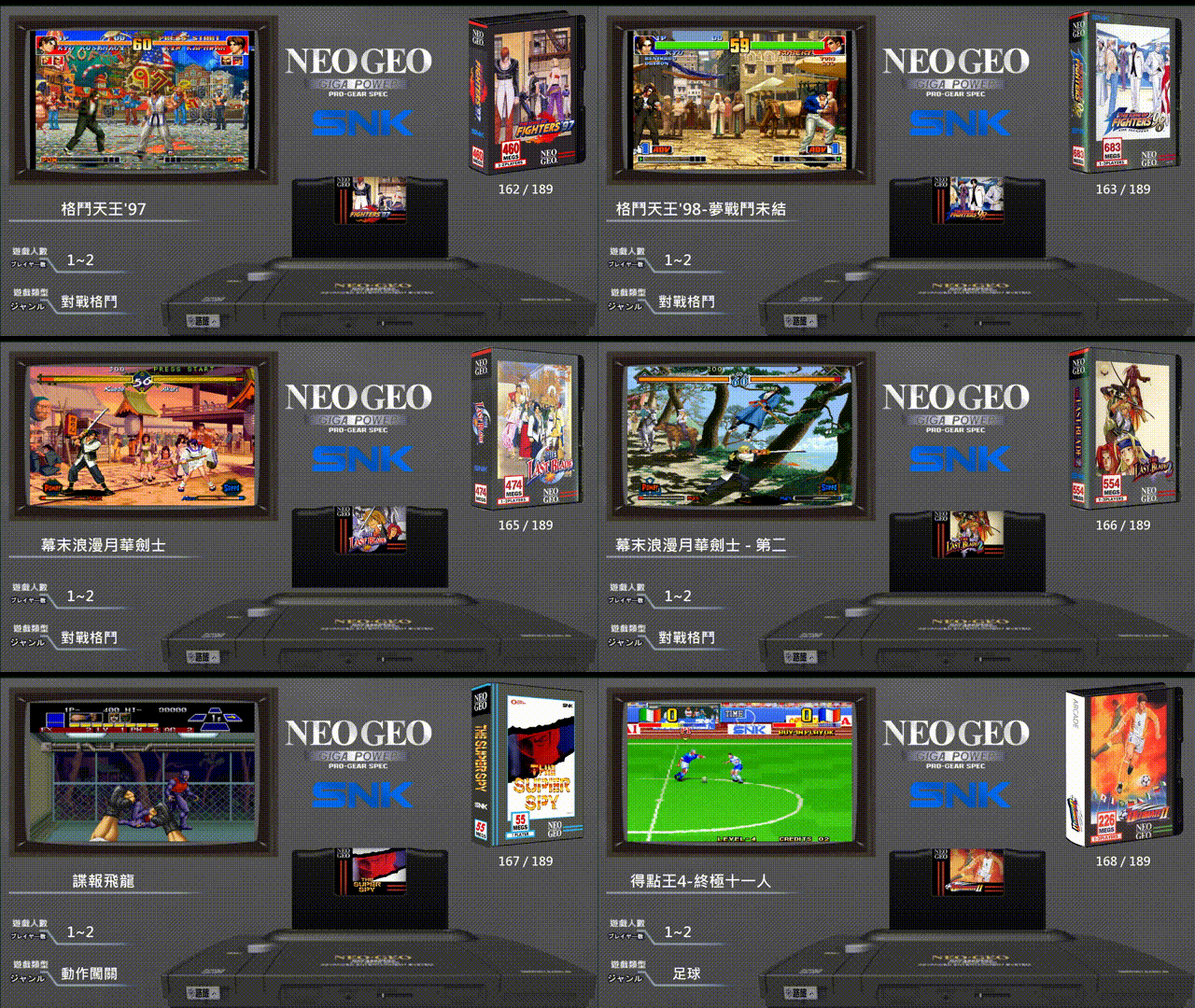
前端美化:NEOGEO AES(188主ROM)
https://gmerago.com/forum.php?mod=viewthread&tid=6663
紅色部分就是卡匣參數~~可以加到你的前端參數~
--------------------------------------------------------------------------------------------------------------------------------------------
class UserConfig {
</ label="-------- Main theme layout --------", help="Layout Options", order=1 /> uct1="select below";
</ label="Select side image", help="Select image", options="wheel,marquee,Boxart,Flyer", order=2 /> sideimage="marquee";
</ label="Random Wheel Sounds", help="Play random sounds when navigating games wheel", options="Yes,No", order=3 /> enable_random_sound="Yes";
</ label="Logo Artwork", help="The artwork to display in the upper right corner", options="logo,snap,marquee,flyer,wheel", order=4 />
logo="logo";
</ label="Enable Middle Nav", help="啟用中間左右切換類別功能", options="Yes,No", order=5 />
enable_mid_nav="Yes";
}
// 畫面大小與基本設定
local my_config = fe.get_config();
fe.layout.font = "slicker";
fe.layout.width = 1280;
fe.layout.height = 720;
fe.layout.preserve_aspect_ratio = true;
// 1. 底圖
fe.add_image( "glbg.png", 0, 0, 1280, 720 );
// 2. 預覽影片
fe.add_artwork( "snap", 65, 55, 478, 298 );
// ==========================================
// 3. 精確定位的卡匣與流暢插拔動畫設定
// ==========================================
// 依照你的主機插槽位置,將 X 設為 480,最終插入的 Y 設為 360
local cart = fe.add_artwork( "boxart", 610, 360, 360, 242 ); 插卡的位置
// 動畫變數控制
local anim_y = 360;
local target_y = 360;
local animating = false;
local anim_timer = 0;
function cartridge_animation( ttype, var, ttime ) {
switch ( ttype ) {
case Transition.ToNewSelection:
// 當切換遊戲時,瞬間將卡匣往上抽高(例如 Y 設為 260)
anim_y = 260;
target_y = 360;
cart.y = anim_y;
animating = true;
anim_timer = 0;
break;
}
return false;
}
fe.add_transition_callback( "cartridge_animation" );
// 每一格畫面更新動畫位置(確保所有環境都能順暢執行插入動畫)
function update_animation( ttime ) {
if ( animating ) {
// 漸進式向下插回目標位置 (數值越小插得越快)
anim_y += (target_y - anim_y) * 0.1; 這可以調整插卡上下的速度
cart.y = anim_y.tointeger();
// 當接近目標位置時停止動畫
if ( abs(target_y - anim_y) < 1 ) {
cart.y = target_y;
animating = false;
}
}
}
fe.add_ticks_callback( "update_animation" );
// 4. 文字資訊與標籤
local gamenum = fe.add_text("[ListEntry] / [ListSize] ", 1040, 380, 160, 30);
gamenum.set_rgb( 255, 255, 255 );
local Play = fe.add_text("[Players]", 120, 530, 100, 35);
Play.set_rgb( 255, 255, 255 );
local Cate = fe.add_text("[Category]", 100, 620, 180, 35);
Cate.set_rgb( 255, 255, 255 );
local Lang = fe.add_text("[Title]", 0, 420, 440, 38);
Lang.set_rgb( 255, 255, 255 );
fe.add_artwork( "marquee", 1000, 10, 250, 356 );
------------------------------------------------------------------------------------------------------------------------
Attract-Mode教學:1基礎認識
https://gmerago.com/forum.php?mod=viewthread&tid=6702
Attract-Mode教學:2.文字設定
https://gmerago.com/forum.php?mod=viewthread&tid=7476
Attract-Mode教學:3.中文化
https://gmerago.com/forum.php?mod=viewthread&tid=7516
Attract-Mode教學:4.romlists編輯
https://gmerago.com/forum.php?mod=viewthread&tid=7569
Attract-Mode教學:5.各模擬器參數設定
https://gmerago.com/forum.php?mod=viewthread&tid=7778
Attract-Mode教學:6.換頁
https://gmerago.com/forum.php?mod=viewthread&tid=9146
Attract-Mode教學:7.影片角度
https://gmerago.com/forum.php?mod=viewthread&tid=9263
Attract-Mode教學:8.模擬器整合
https://gmerago.com/forum.php?mod=viewthread&tid=9389
Attract-Mode教學:9.模擬插卡
https://gmerago.com/forum.php?mod=viewthread&tid=9719
|
評分
-
查看全部評分
|




 發表於 2026-7-28 07:12:38
 發表於 2026-7-28 08:37:16

 樓主
樓主