遊戲年代 GOAL GOAL

 找回密碼
 立即註冊
搜索
查看: 197|回復: 1

Attract-Mode教學:6.換頁

[複製鏈接]

195

主題

1296

帖子

2萬

積分

版主

Rank: 7Rank: 7Rank: 7

積分
21207
發表於 2026-4-25 10:30:26 | 顯示全部樓層 |閱讀模式
本帖最後由 net.man 於 2026-6-18 08:58 編輯

最簡單的方式~也是最少資源變更
參考【NeorageX Classic 2026】【NEOGEO AES+ W】

1.先制定要有幾頁切換,假如4頁


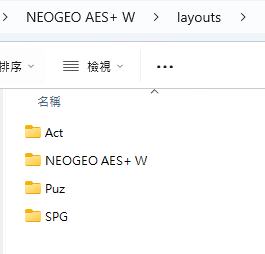
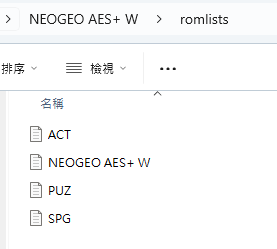
2.在  ↓ 2個資料夾分別新增4個
  \layouts  <--- 4個資料夾
{66960739-6AAE-438E-AF13-C4313D93C264}.png
  \romlists新增  <---4個檔案(跟資料夾名稱一樣,比較好分辨)
{E46A7646-CA4E-429D-A3CF-BF90D1EDCFAF}.png

3.  每一個layout.nut  這個設定檔一定要有 ↓ 參數
    </ label="Enable Middle Nav", help="啟用中間左右切換類別功能", options="Yes,No", order=5 />
    enable_mid_nav="Yes";


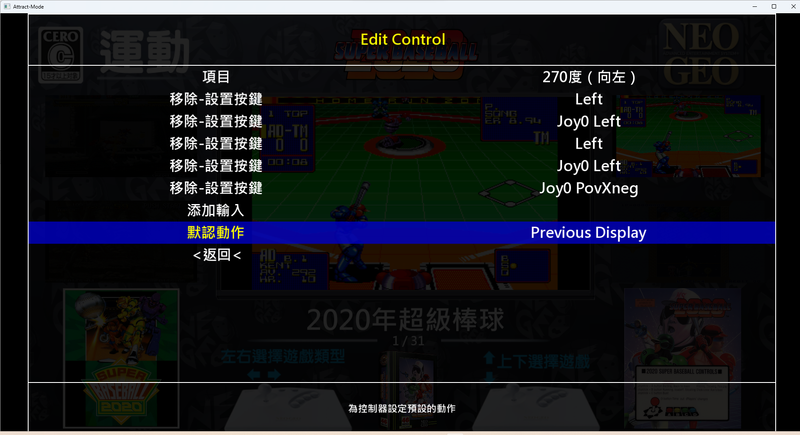
4.進入介面開啟設置 --> 控制器 --> Left、Right2個方向
01方向.png

   Left(Prtevious Display)   
   Right(Prtevious Display)
   這就可以左右切換頁面,反之修改Up、Down就變成上下切換頁面
02方向.png


5. \layouts\各頁面\可自行設定畫面不同特色(可參考Attract-Mode教學:1基礎認識來設定頁面)
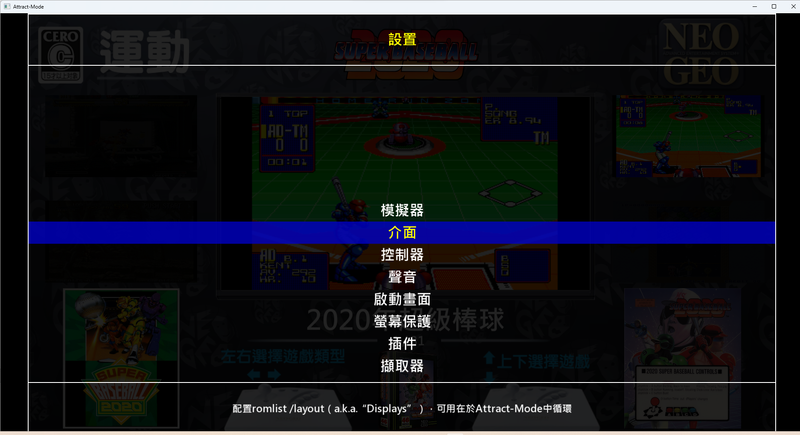
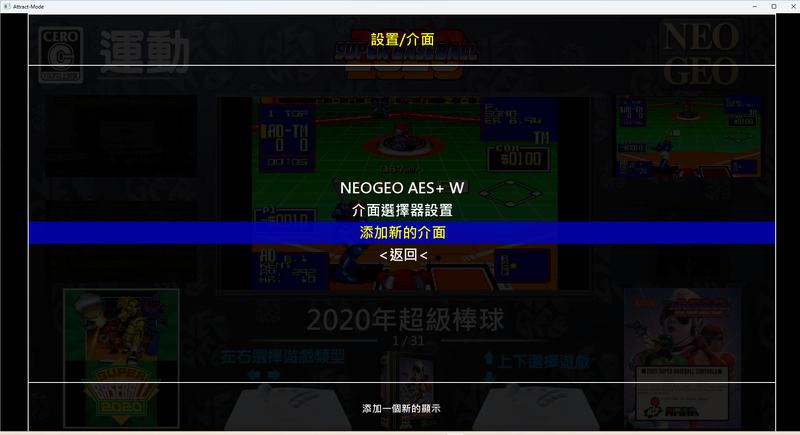
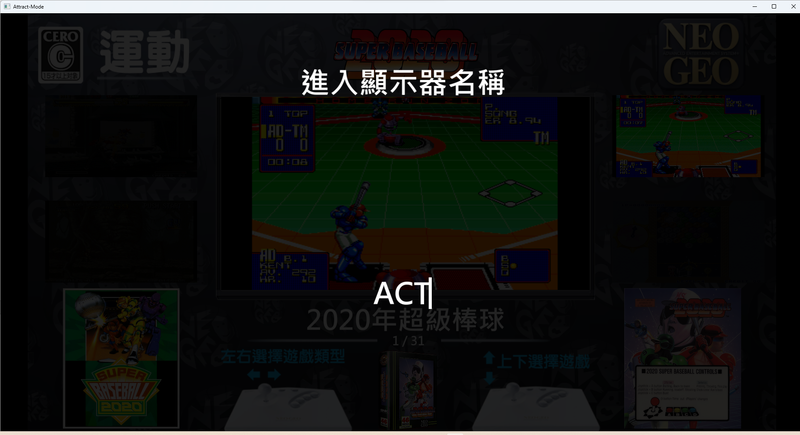
    在進入「設定」 -->  介面  -> 新增介面
00介面.png
01介面.png
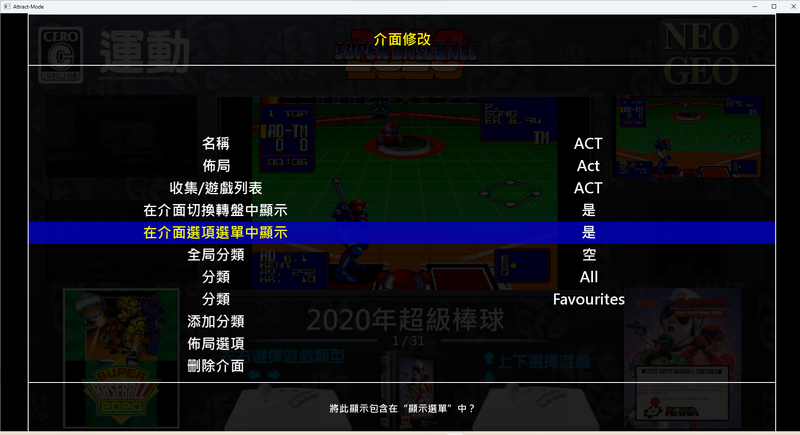
02介面.png
    再到介面選擇對應的【布局】(layouts)、【遊戲列表】(romlists)
如果名稱都是一樣的就會看到名稱、佈局、、遊戲列表,3個名稱都一樣就很清楚
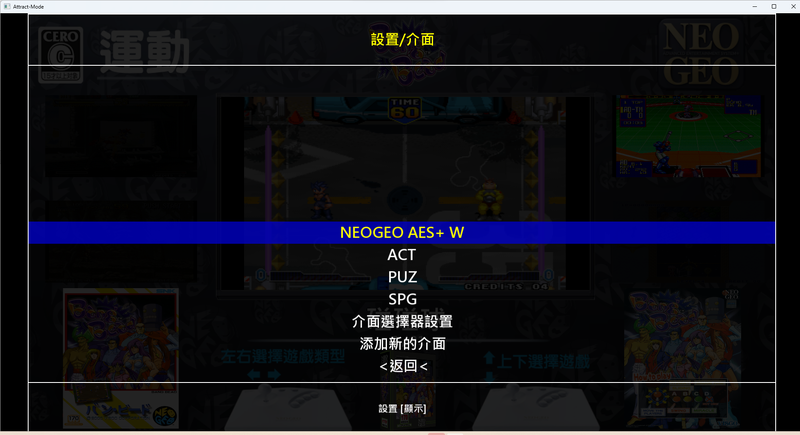
03介面.png

完成設定後~~就可以很絲滑的切換....要幾頁有幾頁
{6AF4DE23-3F15-48BF-9223-491161E85945}.png


Attract-Mode教學:1基礎認識
https://gmerago.com/forum.php?mod=viewthread&tid=6702

Attract-Mode教學:2.文字設定
https://gmerago.com/forum.php?mod=viewthread&tid=7476

Attract-Mode教學:3.中文化
https://gmerago.com/forum.php?mod=viewthread&tid=7516

Attract-Mode教學:4.romlists編輯
https://gmerago.com/forum.php?mod=viewthread&tid=7569

Attract-Mode教學:5.各模擬器參數設定
https://gmerago.com/forum.php?mod=viewthread&tid=7778

Attract-Mode教學:6.換頁
https://gmerago.com/forum.php?mod=viewthread&tid=9146

Attract-Mode教學:7.影片角度
https://gmerago.com/forum.php?mod=viewthread&tid=9263

Attract-Mode教學:8.模擬器整合
https://gmerago.com/forum.php?mod=viewthread&tid=9389


評分

參與人數 1威望 +1 金錢 +30 貢獻 +1 收起 理由
ili789 + 1 + 30 + 1 感謝分享

查看全部評分

回復

使用道具 舉報

7

主題

5324

帖子

4858

積分

金牌會員

Rank: 6Rank: 6

積分
4858
發表於 2026-4-26 00:47:36 | 顯示全部樓層
讚讚讚!!!感謝大大的分享遊戲資訊~~~好人一生平安~~~
回復

使用道具 舉報

您需要登錄後才可以回帖 登錄 | 立即註冊

本版積分規則

Archiver|小黑屋|遊戲年代 GOAL GOAL

GMT+8, 2026-6-23 18:32 , Processed in 0.021657 second(s), 23 queries .

Powered by Discuz! X3.4

Copyright © 2001-2021, Tencent Cloud.

快速回復 返回頂部 返回列表